 Pray With Friends
Help center
How can we help?
Find answers about privacy, prayer circles, invitations, account security, and installing the app on your phone.
Learn circles, invitations, prayer updates, and more—one short lesson at a time.
Install the app
Put Pray With Friends on your Home Screen
Use Pray With Friends in your web browser on a phone, tablet, or computer. On iPhone and Android, you can also add it to your Home Screen and open it from an app icon—no app store download needed. Choose a guide below for illustrated instructions.
Help topics
34 topicsBible & ScriptureHow do I switch Bible versions?
Open Bible and use the Bible version dropdown. BSB (Berean Standard Bible) is the default and uses modern English. ASV (American Standard Version, 1901) offers traditional wording. Switching keeps the same book, chapter, and verse, and remembers your preference for next time and the Verse of the Day. Previously saved verses and prayer attachments keep their original version.
Bible & ScriptureCan I use the Bible at church?
Yes. Tap Bible in the bottom navigation (or the sidebar on a computer). Choose a book and chapter to follow along, adjust Text size for comfortable reading, or search a reference such as John 3:16. The reader remembers the last verse you selected. The complete Berean Standard Bible (BSB) and American Standard Version (ASV) are free with your account. Reading currently requires an internet connection.
Bible & ScriptureHow do saved verses and the Verse of the Day work?
Home shows a Verse of the Day in your preferred Bible version that changes with the date in your account’s time zone. Tap Save, or select a verse in the Bible and choose Save verse. Find them under Bible → Saved verses. Saved verses are private to your account and sync across your signed-in devices. Each saved verse keeps the version you selected; you can save the same passage in both versions.
Bible & ScriptureHow do I add Scripture to a prayer?
Tap Pray about this on the daily verse or in the Bible to start a prayer with that verse attached. You can also choose Add Scripture while creating or editing your own prayer, search a passage, or explore a topic. Check Share with before posting: the verse follows the same audience as the prayer. Choose BSB or ASV in Scripture search. Each prayer keeps the wording and version of its attached verse, even if you later change your reading preference. You can change or remove the verse before saving.
Install appDoes Pray With Friends work in a browser as well as on my phone?
Yes. Use Pray With Friends in your web browser on a computer, tablet, or phone. You can also add it to your iPhone or Android Home Screen and open it from an app icon. No app store download is needed. Sign in with the same account to access your prayers and circles across devices.
Install appHow do I install Pray With Friends on an iPhone?
Use Safari to add Pray With Friends to your Home Screen so it opens in its own app-like window.
- Open Pray With Friends in Safari.
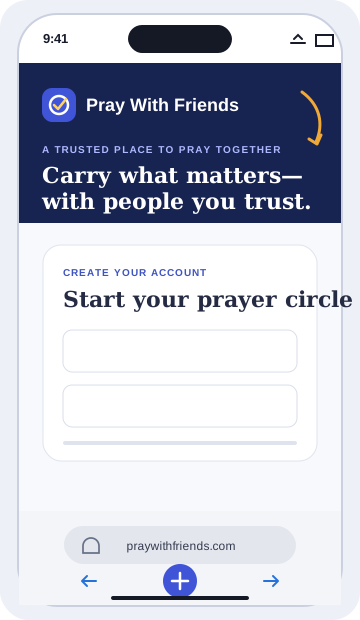
- Tap More, then Share. Depending on your Safari layout, you may see the Share button directly.
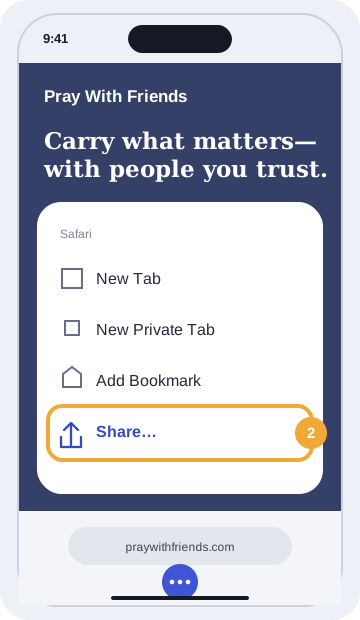
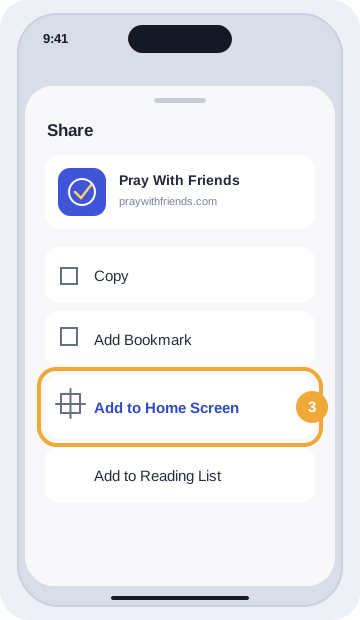
- Scroll down and tap Add to Home Screen.
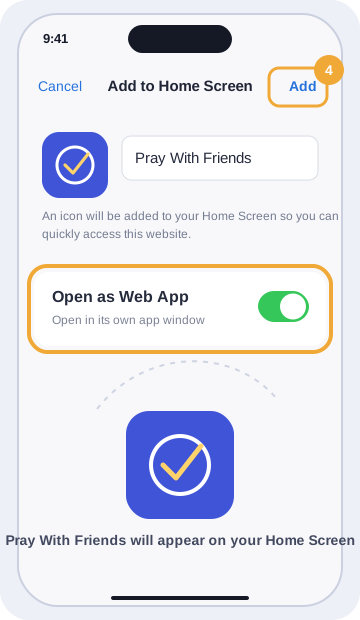
- Turn on Open as Web App, then tap Add.
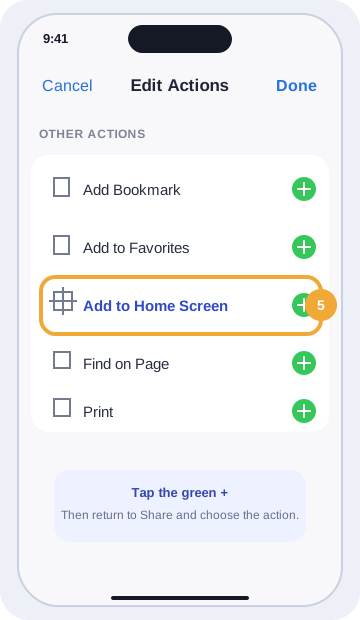
- If Add to Home Screen is missing, scroll to the bottom, tap Edit Actions, and add it there.
Install appHow do I install Pray With Friends on an Android phone?
Use Chrome to install Pray With Friends from the browser menu.
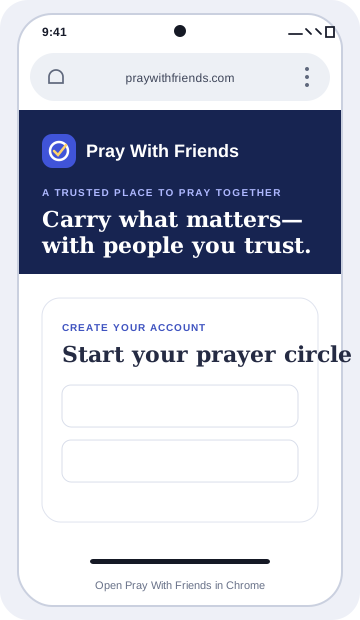
- Open Pray With Friends in Chrome.
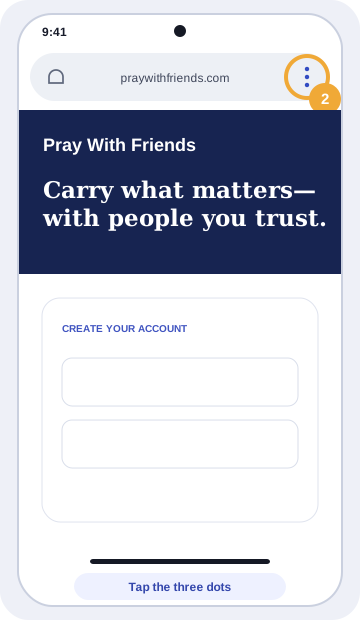
- Tap More—the three dots beside the address bar.
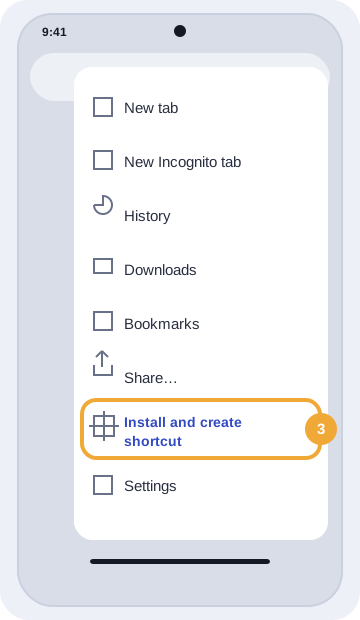
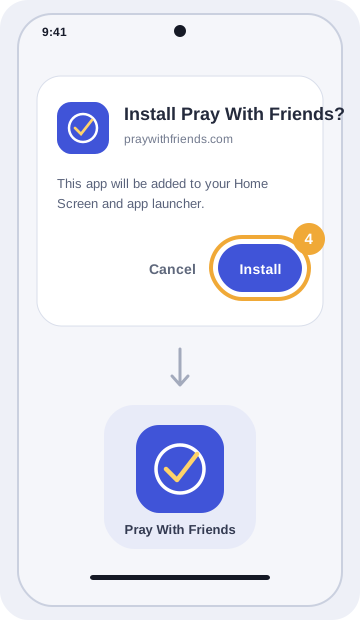
- Tap Install and create shortcut, then Install. On some phones, the option is called Install app.
- Follow the on-screen instructions. Pray With Friends icon will appear on your Home Screen or in your app launcher.
PrivacyWho can see my personal prayers?
Only you can see prayers in My Personal Prayers. Joining a church never gives church leaders or members access to that private space.
ChurchesWhat happens when I join a church?
The church and its circles appear alongside your personal circles in the same account. Your private prayers and unrelated circles stay separate.
InvitationsHow do I invite a friend?
Choose Invite friends from the sidebar or top bar. You can email an invitation or copy the public signup link. A circle invitation grants access only after the person accepts it.
InvitationsCan I review or decline an invitation before joining?
Yes. Opening an invitation shows who invited you and where it leads. Nothing is joined automatically. You can accept, decline, or close it and decide later.
InvitationsCan I resend an invitation?
If you manage the destination, open its invitation history and choose Resend. The old link stops working and a new seven-day link is sent. Accepted or declined invitations cannot be resent.
PrivacyWho sees a confidential church request?
Only members explicitly assigned to the church's confidential prayer-team circle can see it. It never appears in the general church feed.
Prayer requestsWhat does “I Prayed” do?
It lets the person know their request was remembered today. Pray With Friends does not use leaderboards or competitive streaks.
MembershipWhat happens if I leave a circle or church?
Access ends immediately. Leaving a church removes access to every circle owned by it. Your account, personal prayers, private circles, and other church memberships remain intact. Owners must transfer ownership before leaving.
CirclesHow do I rename or delete a prayer circle?
Open Circles, choose the circle, then select Edit name or Delete circle. Managers can rename assigned circles. Only the circle owner or an authorized church administrator can delete one. System-created circles cannot be renamed or deleted. Deleting a circle immediately ends member access and removes its prayers from the app.
AccountHow do I download my data?
Open Account & privacy from your profile, then choose Download your data. The private JSON file contains your profile, memberships, authored prayers and updates, and preferences—not other members’ prayer text.
AccountWhat if I forget my password?
Choose Forgot your password? on the sign-in screen. If the email matches an account, Pray With Friends sends a one-use reset link that expires in one hour. The message never contains prayer text.
AccountHow do I sign out another device?
Open Account & privacy, then Password & sessions. You can review active sessions and sign out any other device. Changing your password also invalidates other signed-in sessions.
Account securityHow do I turn on multi-factor authentication?
Open Account & privacy and find Multi-factor authentication. Enter your password, scan the QR code with Microsoft Authenticator, Google Authenticator, Authy, or another compatible app, and confirm its six-digit code. Save the one-use recovery codes before finishing.
Account securityWhy am I required to set up an authenticator?
Multi-factor authentication is mandatory for platform administrators because those accounts can perform sensitive account and safety operations. Church owners and administrators are encouraged to enable it from account settings.
Account securityWhat if I lose access to my authenticator app?
Use one of your saved recovery codes in place of the six-digit code. Each recovery code works once. After signing in, create a replacement set in Account & privacy; the new set invalidates every older recovery code.
AccountWhat happens when I request account deletion?
Pray With Friends schedules deletion 30 days later. You can keep signing in and cancel from Account & privacy during that grace period. In the private alpha, the request and date are recorded, but automated final removal remains disabled until the retention policy is approved.
AccountCan I add a profile picture or church logo?
Yes. Add your picture under Account & privacy or a church logo under Churches and Church details. Images must be 5 MB or smaller. Pray With Friends resizes them, converts them to WebP, removes supplied metadata, and serves them only to authorized signed-in members.
ChurchesHow do I update or close a church workspace?
Owners and administrators can edit church details. Only the owner can close the workspace, using the exact church name and current password. Closing immediately ends church memberships, circles, and pending invitations without changing anyone's personal prayers or circles.
NotificationsCan I control prayer notifications?
Yes. You can choose in-app, email, or web-push preferences and set quiet hours. Lock-screen notifications do not show prayer text by default.
NotificationsHow do I enable browser notifications?
Open Notifications, expand Notification settings, and choose Enable on this device. Your browser asks for permission only after you choose that button. Each browser can be disabled separately, and lock-screen alerts never include prayer text. This option appears after production web push is activated.
AnnouncementsWhat are Pray With Friends announcements?
They are server-controlled messages from the team behind Pray With Friends about updates, maintenance, or important account information. They appear after sign-in and never include private prayer content supplied by the system.
AnnouncementsWhy does an announcement keep appearing?
Some important messages remain visible until you choose Acknowledge. Other announcements appear once or at the beginning of each sign-in session.
SafetyHow do I report a privacy or safety concern?
Open the request's menu and choose Report. Pray With Friends is not an emergency service; contact local emergency services when someone may be in immediate danger.
SafetyWhere can I read the Community Guidelines?
Open /community-guidelines without signing in, or use the Community Guidelines link in Account & privacy. The guidelines explain privacy, respectful conduct, prohibited behavior, reporting, enforcement, and appeals.
SafetyWhat happens when I block someone?
You stop seeing one another’s prayers, updates, invitations, and notifications. Shared-circle membership does not change, and authorized moderators can still review reported content. Manage blocked members from Account & privacy.
PrivacyWhat can Pray With Friends platform administrators see?
Authorized staff can see account identity, status, verification, membership counts, church operations, reports, and audit history. The user directory never includes private prayer content. Reported prayer text appears only inside its safety case.
AccountCan a platform administrator change my password or prayer text?
No. Administrators can suspend or reactivate an account and force sign-out when required, but they cannot read passwords, set a password for you, or rewrite prayer text. Administrative actions require a reason and are audit logged.
Have an idea for Pray With Friends?
Sign in, open your profile picture, and choose Ideas & support. Send your suggestion there and return later to see its status or a reply.
Privacy or safety concern?
After signing in, use the request menu to report content or submit a private support request from Account & privacy. If someone is in immediate danger, contact local emergency services.